!SOFTHUB INSTRUKTION!
Installing software from the developer SoftHub
To begin with, if after following all the instructions, the cheat does not work for you, first we do everything that follows the link below, and if this does not help, then you can contact the technical support! Discord
Download Cheat
Acquaintance with the launcher.
For the launcher to work, you need a flash drive, it will only start from it.
After launching the launcher for the first time, you will need to accept the agreements that the launcher writes about.
Further, if you do not have an account, you need to register it. Login length must be more than three characters without spaces. The screenshot is signed Your login for visualization. Example:

Further, after registration, you must enter your account using the Log In button. Your data will be saved.
The key is activated according to the screenshot below:

After activation, you will have a subscription available and the time will be charged, below is a screenshot of how it looks + basic information:
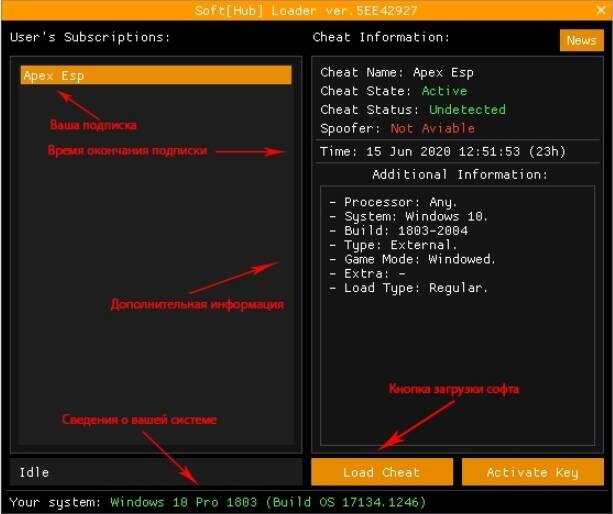
To load the software, the corresponding Load Cheat button is pressed. Usually the launcher accompanies the download with instructions and prompts for the next step.
Instructions for starting software.
BFV / GTAV / WARFACE / Warzone:
Before you start all the manipulations, open the game and make it in windowed or windowed without a frame, otherwise the software WILL NOT WORK! close the game and go to the loader.After clicking Load Cheat, the main files will be loaded.Two consoles will pop up, which will display Success if the download is successful. Next, the launcher will ask you to open the game, follow point 2.! If Failed or number errors with a hash symbol popped up in the console and the launcher displays a message that something went wrong, then try downloading the software again, making screenshots / writing down error numbers and contacting technical support with them.Start the game and wait for the software menu. Appears within 40 seconds - one minute.
Buttons for opening / closing the software menu F2 or F7 or Insert.
Instructions for Apex Esp / Apex Full / Caliber / Pubg Steam / Pubg Lite / R6 / Pubg Mobile games:
Before you start all the manipulations, open the game and make it in windowed or windowed without a frame, otherwise the software WILL NOT WORK! + Set vertical sync in the game settings for smooth operation.
After clicking Load Cheat, the main files will be loaded.
For Apex Esp / Apex Full / Caliber / Pubg Mobile, one console will pop up and display Success if the download is successful.
For Pubg Steam / Pubg Lite / R6, two consoles will pop up that will display Success if the download is successful.
! If in both of the above cases Failed or numbered errors with a pound symbol popped up in the console and the launcher displays a message that something went wrong, then try downloading the software again, making screenshots / writing down error numbers and contacting technical support with it.
After the previous consoles, another concluding console will appear after which the launcher will inform you about the start of the game and close with the removal of the flash drive.
The lines in the last console should be “Waiting dependency ...”, “Processing ...” and “Done”. This corresponds to the fact that everything went well.
If "Waiting dependency ..." hangs for a long time while the last console is running (about 5 minutes) - contact technical support and inform it.
If during the work of the last console after “Waiting dependency…” and “Processing…” “Failed” is displayed - contact technical support and inform it.
Start the game and wait for the software menu. It will appear within 40 seconds - one minute.
Buttons for opening / closing the software menu F2, F3 or Insert.
Erstelle deine eigene Website mit Webador